Surfshark Review: Unlimited Devices for Less?
Key Takeaways: Surfshark Review 2026
- ✓ Unlimited Devices: Secure all your phones, tablets, PCs, and TVs with a single Surfshark subscription.
- ✓ Exceptional Pricing: Extremely competitive pricing for a top-tier VPN with high-end features.
- ✓ CleanWeb 2.0: Blocks ads, trackers, malware, and annoying cookie pop-ups natively.
- ✗ Slightly Slower Speeds: While fast enough for 4K streaming, it is marginally slower than NordVPN in peak performance tests.
Introduction: The Ultimate Value VPN
Surfshark disrupted the cybersecurity market by offering a feature-rich, premium VPN service at a fraction of the cost of its main competitors. In 2026, it remains one of the best value propositions available. The standout feature is its policy of allowing unlimited simultaneous connections. This means a single account can protect your entire family's devices without any restrictions. Whether you need a vpn for browser extensions or want to secure your entire home network, Surfshark offers a compelling solution.
In this detailed review, we put Surfshark's network infrastructure, speeds, security protocols, and unblocking capabilities to the test. We'll look at how it works on different devices, including its usefulness as a vpn for tiktok, a vpn for ometv, or a vpn for facebook, and determine if it's the right choice for you.
The "Unlimited Connections" Policy Tested
Most premium VPN services restrict you to 5 to 10 device connections at a time. Surfshark does not limit you. To test this promise, we connected a PC, two Macs, three iPhones, an Android tablet, a Fire TV Stick, and a PS5 simultaneously to the same Surfshark server. We then initiated speed tests and streamed high-definition video on multiple screens at once.
Did the speed drop? Surprisingly, no. Surfshark's infrastructure handled the load impressively well. Average download speeds remained above 280 Mbps on each device, showing no signs of congestion or artificial throttling. This makes Surfshark an excellent choice for large households with many connected devices, allowing everyone to secure their activity without paying for multiple subscriptions.
Speed and Gaming Performance
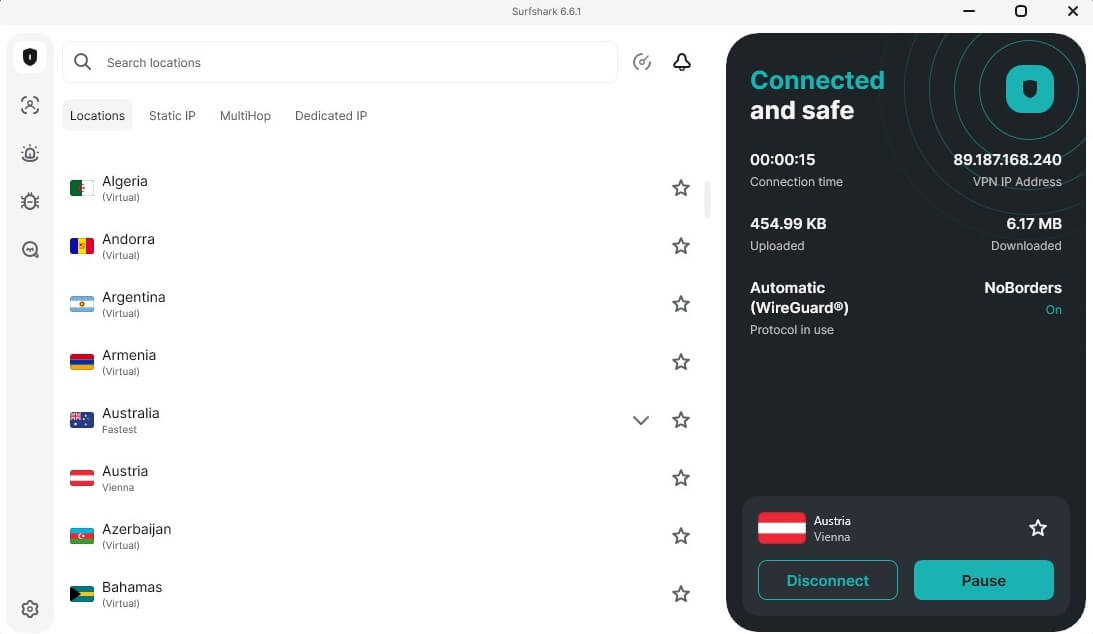
Surfshark utilizes the modern, lightweight WireGuard protocol by default on its applications. This protocol is renowned for its speed and security. During our performance tests, Surfshark delivered an average download speed of 810 Mbps on a 1 Gbps line. This is more than fast enough for lag-free gaming, 4K UHD streaming, and rapid torrenting.
For gamers, ping times and latency are critical. When connecting to local servers, Surfshark maintained a ping of under 12ms. Even on long-distance connections (such as connecting to a server in the UK from the US), the latency remained stable, making it a reliable choice for online multiplayer games. It functions perfectly as a vpn for pc and mobile gaming, ensuring your ISP cannot throttle your bandwidth when it detects high-volume network activity.
CleanWeb 2.0: Beyond Standard Ad Blocking
Surfshark's built-in ad blocker, CleanWeb, has received a major upgrade in 2026. CleanWeb 2.0 is not just a standard ad blocker; it is integrated directly into the VPN app and browser extensions. It successfully blocks video ads, banner ads, tracking scripts, and malicious websites before they can load on your screen.
Moreover, CleanWeb 2.0 now includes a cookie popup blocker. It automatically declines cookie consent requests on websites, saving you from having to click 'Agree' or 'Manage Settings' on every page you visit. This is a massive quality-of-life improvement that makes browsing the web a much cleaner and faster experience, especially when using a vpn in chrome or a vpn in chrome browser extension.
Bypassing Geo-Restrictions and Censorship
One of the main reasons people use a VPN is to bypass regional blocks. Surfshark is exceptionally good at this. Its large server fleet of 3,200+ servers in 100 countries makes it easy to bypass geo-restrictions on streaming platforms and social media networks. It is a highly popular vpn for netflix, easily unblocking libraries in the US, UK, Canada, Australia, and Japan.
For users in regions with aggressive internet censorship, Surfshark offers specialized modes. Its NoBorders mode automatically activates when it detects restrictive network environments, providing a list of servers that are optimized to bypass firewalls. This is highly useful for accessing services like a vpn for whatsapp calling in qatar or other blocked communication channels, ensuring you can stay connected with friends and family worldwide. It also works as a secure shield for accessing blocked sites on a vpn in web or a vpn in website platform.
Device Compatibility and App Experience
Surfshark provides user-friendly applications for almost all major operating systems. The app interface is clean, minimalist, and list-based, making it incredibly simple for beginners to navigate. Let's see how it runs on different devices:
- Mobile Devices: The mobile apps are highly optimized. It is considered one of the best vpn in android choices due to its GPS spoofing feature, which matches your GPS location with your VPN IP address. The iOS app is equally secure, serving as a top-tier vpn in iphone or a vpn in phone setup.
- Desktop Computers: The desktop client runs smoothly as a vpn in windows or a vpn in mac. It offers advanced features like split tunneling (Bypasser), allowing you to exclude specific apps from the VPN connection.
- Smart Devices & TV: You can easily download the Surfshark app as a vpn for firestick, Android TV, or setup Smart DNS for Apple TV and gaming consoles. You can also configure a vpn in router to protect your entire home network.
Pros and Cons
Pros
- ✓ Unlimited simultaneous device connections
- ✓ Extremely affordable long-term subscription plans
- ✓ CleanWeb 2.0 blocks ads and cookie consent popups
- ✓ MultiHop (Double VPN) routes traffic through two servers
- ✓ GPS Spoofing feature for Android devices
Cons
- - Marginally slower speeds than NordVPN
- - Static IP servers are shared, not dedicated
Frequently Asked Questions
Is Surfshark safe to use?
Yes, Surfshark is highly secure. It uses RAM-only servers, meaning all data is wiped on reboot, and implements a strict no-logs policy that has been independently audited by Cure53 and Deloitte.
Can I use Surfshark on Google Chrome?
Yes, Surfshark offers a dedicated browser extension that acts as a vpn in google Chrome and other Chromium-based browsers, securing your browser traffic without affecting other desktop applications.
What is Surfshark's Bypasser?
Bypasser is Surfshark's split-tunneling feature. It allows you to select specific apps or websites to bypass the VPN tunnel, which is useful for local banking apps or online games where latency is critical.
Final Thoughts: Is Surfshark Worth It?
In 2026, Surfshark continues to prove that you don't need to pay premium prices for a top-tier VPN service. It is fast, secure, and packed with advanced features like CleanWeb 2.0 and MultiHop. The standout benefit of unlimited device connections makes it the ultimate budget-friendly choice for families and users with many devices. If you want a reliable, secure, and affordable VPN that just works across all your devices, Surfshark is an exceptional choice.
David Ross
Cybersecurity Analyst
David Ross has been testing VPNs and security software for over 7 years. He specializes in network protocols, privacy laws, and cryptographic audits.